

2025년 11월 2일
Embers 게임은 오픈 월드를 기반으로 하는 MMORPG 게임이다. 이 때문에 맵을 어디까지 로딩할지, 어떻게 로딩할지는 메모리 관리 등의 성능적인 측면에서 매우 중요한 문제이다.
이 게임에서는 청크 시스템을 사용하기로 했다.

청크 시스템은 플레이어의 위치(사진상 중앙)를 기준으로 주변 1칸에 해당하는 맵만 로딩하여 메모리 효율성을 높이는 것이다.
각 맵은 별도의 씬(Scene)들로 저장되어, 플레이어의 위치가 이동할 때마다 필요없는 씬은 Unload시키고, 필요한 씬은 load시키는 것이 핵심이다.
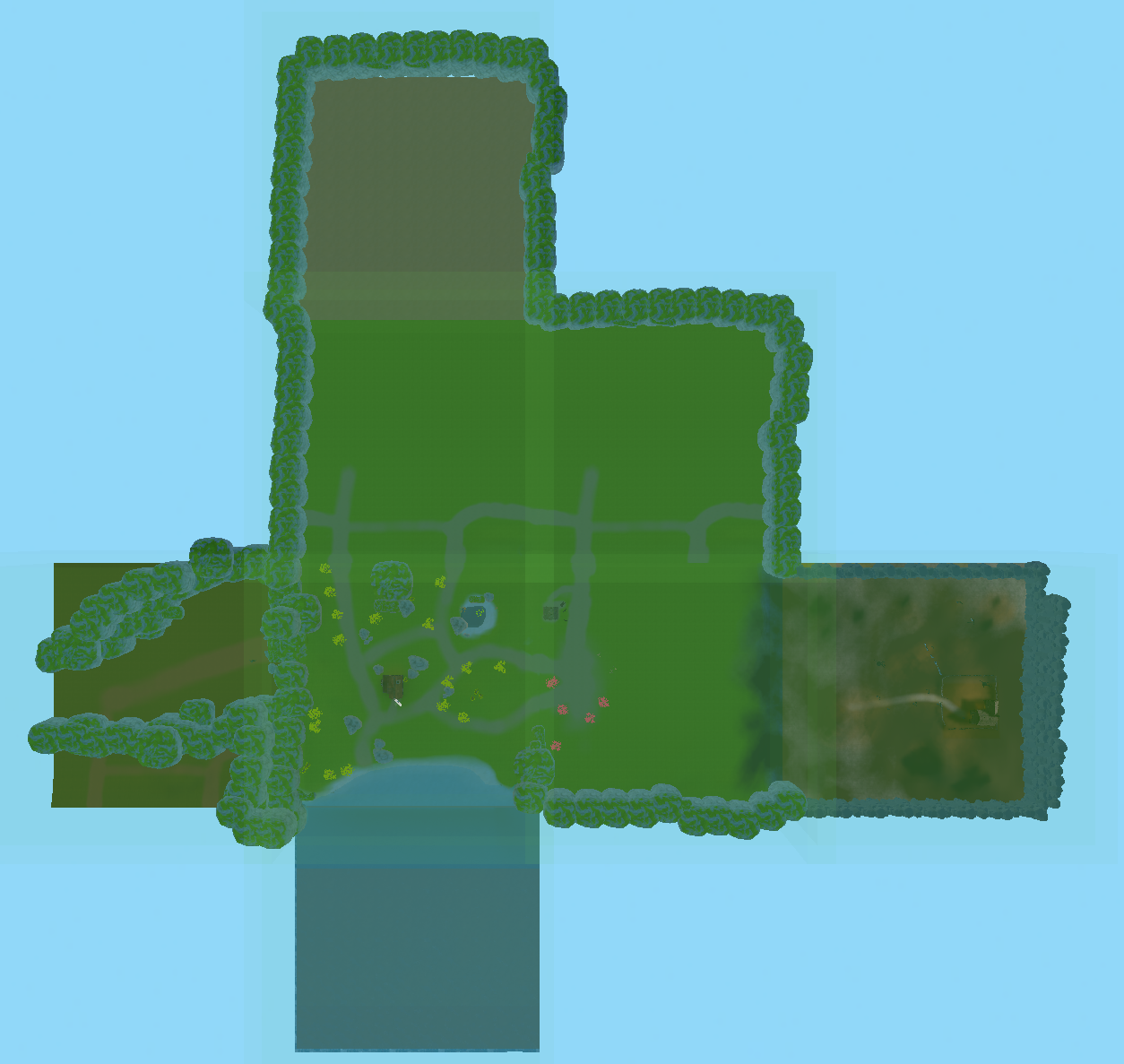 Embers에서는 이런식으로 구현되어 동작한다. 현재는 정사각형 형태로만 구현했지만 지형 특성이나 맵 디자인에 따라 지형을 다르게하고, 씬만 분리해주면 된다.
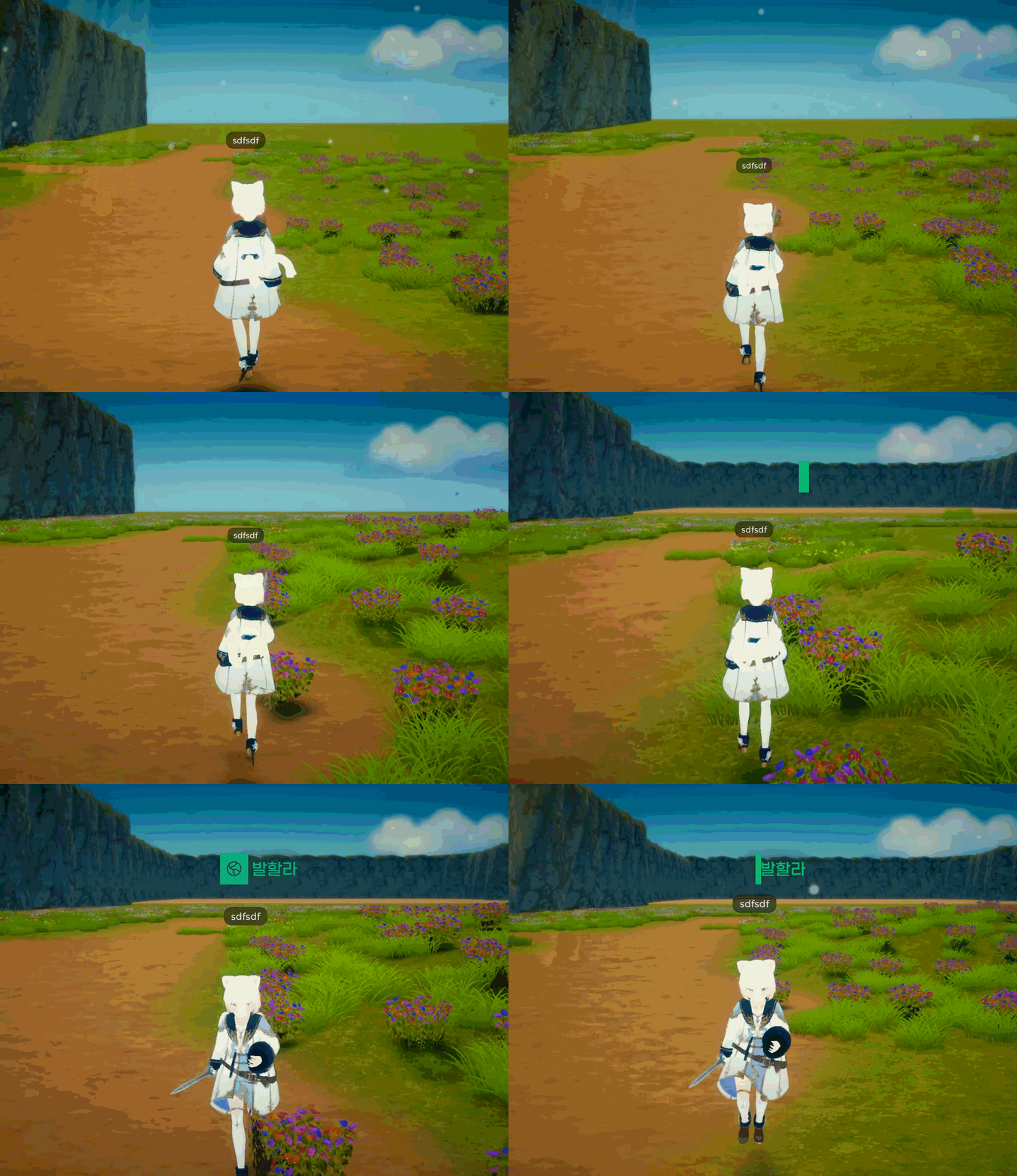 영상과 같이, 씬의 경계를 넘어갈 때(현재 맵의 이름이 중앙에 표시될 때) 새로운 씬이 멀리서 로드된 것이 보일 것이다.
청크 로딩은 다음과 같이 구현했다.
public void RequireUpdateChunk(Vector3 playerPosition)
{
    UpdateChunks(playerPosition).Forget();
}

private async Awaitable UpdateChunks(Vector3 playerPosition)
{
    Vector2Int currentChunkCoord = GetChunkCoord(playerPosition);
// playerPosition값 기준으로 필요한 청크 계산
List<Vector2Int> chunksToLoad = new List<Vector2Int>();
for (int x = -(Singleton.Game.LoadRange); x <= Singleton.Game.LoadRange; x++)
{
    for (int z = -(Singleton.Game.LoadRange); z <= Singleton.Game.LoadRange; z++)
    {
        Vector2Int coord = new Vector2Int(currentChunkCoord.x + x, currentChunkCoord.y + z);
        chunksToLoad.Add(coord);
    }
}

// 1) 필요한 청크 로드
foreach (var coord in chunksToLoad)
{
    if (!chunkStates.ContainsKey(coord) || chunkStates[coord] == ChunkLoadState.NONE)
    {
        string sceneName = $"Chunk_{coord.x}_{coord.y}";

        // **여기서 chunkList의 ChunkInfo에 sceneName이 있는지 검사**
        bool existsInList = chunkList.chunkSceneNames.Any(ci => ci.sceneName == sceneName);
        if (!existsInList)
        {
            chunkStates[coord] = ChunkLoadState.LOADED;
            continue;
        }

            await LoadChunk(sceneName, coord);
    }
}

// 2) 필요 없는 청크 언로드
var loadedCoords = new List<Vector2Int>(chunkStates.Keys);
foreach (var coord in loadedCoords)
{
    if (!chunksToLoad.Contains(coord))
    {
        if (chunkStates[coord] == ChunkLoadState.LOADED)
        {
            string sceneName = $"Chunk_{coord.x}_{coord.y}";
            await UnloadChunk(sceneName, coord);
        }
    }
}

//플레이어를 InGame씬으로 이동
if (NetworkClient.localPlayer != null)
{
    Scene inGameScene = SceneManager.GetSceneByName("InGame");
    if (inGameScene.isLoaded)
    {
        SceneManager.MoveGameObjectToScene(NetworkClient.localPlayer.gameObject, inGameScene);
    }

   }
// 현재 활성화된 씬 설정
string activeSceneName = $"Chunk_{currentChunkCoord.x}_{currentChunkCoord.y}";
SceneManager.SetActiveScene(SceneManager.GetSceneByName(activeSceneName));

var chunkInfo = chunkList.GetChunkInfo(activeSceneName);
if (chunkInfo != null && chunkInfo.bgm != null)
{
     PlayBGM(chunkInfo.bgm).Forget();
}

}
private async Awaitable LoadChunk(string sceneName, Vector2Int coord)
{
    chunkStates[coord] = ChunkLoadState.LOADING;
var loadOp = SceneManager.LoadSceneAsync(sceneName, LoadSceneMode.Additive);
while (!loadOp.isDone)
{
    await Awaitable.NextFrameAsync();
}

chunkStates[coord] = ChunkLoadState.LOADED;

}
private async Awaitable UnloadChunk(string sceneName, Vector2Int coord)
{
    chunkStates[coord] = ChunkLoadState.UNLOADING;
if (true == SceneManager.GetSceneByName(sceneName).isLoaded)
{
    var unloadOp = SceneManager.UnloadSceneAsync(sceneName);
    while (unloadOp != null && !unloadOp.isDone)
    {
        await Awaitable.NextFrameAsync();
    }
}

chunkStates[coord] = ChunkLoadState.NONE;

}
public Vector2Int GetChunkCoord(Vector3 position)
{
    int x = Mathf.FloorToInt(position.x / Singleton.Game.ChunkSize);
    int z = Mathf.FloorToInt(position.z / Singleton.Game.ChunkSize);
    return new Vector2Int(x, z);
}
이 게임은 멀티플레이 게임이기 때문에 네트워킹에 관련된 처리도 필요했다.
플레이어는 씬의 경계를 넘어갈 때마다 RequireUpdateChunk를 요청하고,
현재 플레이어의 위치에 따라 순차적으로 필요한 씬 로드 → 필요 없는 씬 언로드 → 플레이어 Object의 하이어라키상 위치를 현재 위치한 씬으로 이동의 프로세스를 거치게 된다.
부가적으로, BGM 관리 부분도 추가했다. 현재 재생중인 clip을 저장하고, 다른 씬이어도 BGM은 같을 수 있기 때문에(같은 대단원 지역이라면) BGM의 정보가 변경될 때만 재생 clip이 변경되도록 하였다.
public async Awaitable PlayBGM(AudioClip bgmClip, float fadeDuration = 1.0f)
{
    if (bgmClip == null) return;

//현재 재생중인 BGM과 동일하면 계속 재생(같은 노래 새롭게 시작하는 문제 방지)
if (_currentBGMName == bgmClip.name) return;

_currentBGMName = bgmClip.name;

if (_audioSource.isPlaying)
{
    await FadeOut(fadeDuration);
}

_audioSource.clip = bgmClip;
_audioSource.Play();
await FadeIn(fadeDuration);

}
public async Awaitable StopBGM(float fadeDuration = 1.0f)
{
    if (_audioSource.isPlaying)
    {
        await FadeOut(fadeDuration);
        _audioSource.Stop();
        _currentBGMName = null;
    }
}
private async Awaitable FadeOut(float duration)
{
    float startVolume = _audioSource.volume;
    for (float t = 0; t < duration; t += Time.deltaTime)
    {
        _audioSource.volume = Mathf.Lerp(startVolume, 0, t / duration);
        await Awaitable.NextFrameAsync();
    }
_audioSource.volume = 0;

}
private async Awaitable FadeIn(float duration)
{
    float startVolume = _audioSource.volume;
    _audioSource.volume = 0;
for (float t = 0; t < duration; t += Time.deltaTime)
{
    _audioSource.volume = Mathf.Lerp(0, 1, t / duration);
    await Awaitable.NextFrameAsync();
}

_audioSource.volume = 1;

}
이렇게 동적으로 씬을 로딩하게 될 때, 새롭게 로드되는 씬이 조금 더 부드럽게 로드할 수 있는 방안도 있을 것 같다. 가령 새로 로딩되는 씬의 모든 Object를 순차적으로 로드해주거나, Visible 속성을 사용하는 등 말이다.
네트워킹이 지원되는 오픈월드 게임인만큼, 앞으로도 최적화에 특히 신경을 쓰면서 개발할 예정이다.